
For operators & multi-site teams
Run your community's care from one place
Transparent operator software for everyday use—bookings, schedules, and payroll in clear view. Residents, supervisors, admins, and owners each get a role-based dashboard that's easy to learn and easy to trust.
Built for operators—bookings, schedules, payroll, and role-based dashboards in one platform.

See the platform
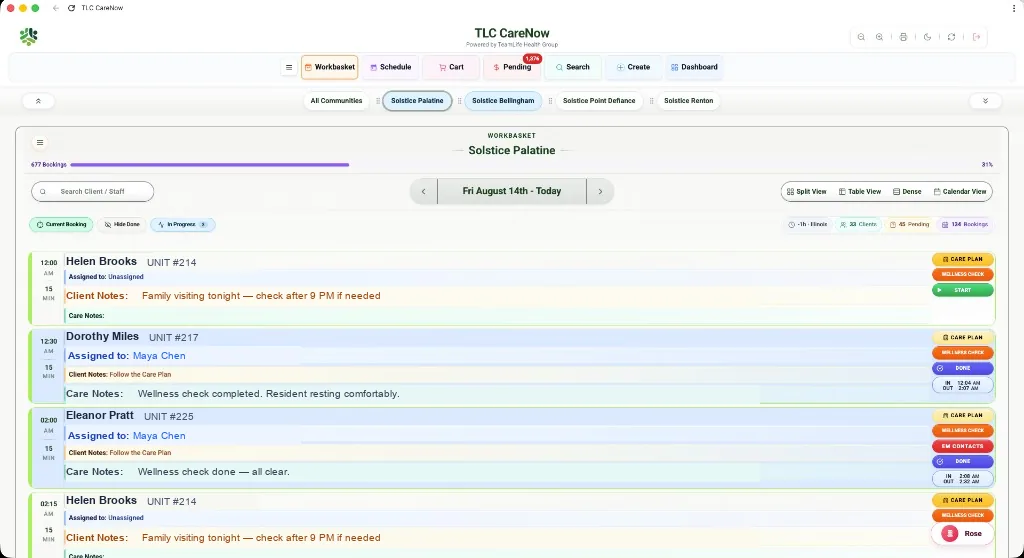
Sample screens from the TLC CareNow admin experience—not a complete product walkthrough. Request a free demo for a live look at the platform.
Supervisors & front desk
Book for any resident in seconds
Book and rebook on behalf—fill a day or a week in minutes, then pay now or later.
Book on behalf
Schedule care for any resident from the desk.
Rebook fast
Change times or copy visits in seconds.
Fill the week
Stack as many bookings as you need, any day.
Pay now or later
Charge at booking, or when it works for the resident.
Operations
Platform tools
Workbasket, schedules, messaging, and reporting—built in, not bolted on.
Workbasket & assignments
New bookings land in one live queue. Assign care pros and update visits in the app—not in spreadsheets.
Schedules & punch
Shared calendars and shift planning. Punch in/out with location checks so you know who's on site.
Messages & reminders
Team messaging plus visit and handoff reminders—so follow-ups don't get lost between shifts.
Reports & insights
Dashboards and snapshots show how care is running. Payroll and pricing stay clear across locations.
Access by role
Roles & permissions
Each role gets its own dashboard—the right tools for the job, without the clutter.
Residents
Resident dashboard
Care professionals
Care pro dashboard
Supervisors
Supervisor dashboard
Admins
Admin dashboard
Owners
Owner dashboard
Care plans
Plans clients can see—and your team can act on
Easy to find, easy to update, and visible on the floor when something changes.
In the app for clients
Residents and families view plans without paperwork or phone tag.
Simple for admins
Update plans in detail when needs change—no second system.
Live in the field
Care pros and supervisors work from the latest plan.
Documentation
Care notes after every visit
Timestamps and notes stay with the visit—from the floor to end-of-shift sign-off.
Start
Open the booking; a timestamp records when care begins.
Finish
Close the visit when done—the finish time locks the record.
Note the service
Capture notes when each service is completed.
End of shift
All notes from the shift compile in one place.
Sign off
The care pro signs off before handoff is complete.
Admin tools
Configure your community
Setup, branding, and day-to-day controls in one admin dashboard—no separate tools for each job.
What admins manage
- CommunitiesSites & settings
- ProductsServices & pricing
- News & EventsCampus updates
- DocumentsShared files
- Team MembersStaff & roles
- ClientsResidents & families
Your brand, in the app
Residents and staff see your community—not a generic template. Admins set how TLC CareNow looks and feels for your campuses.
Next step
See it live—then we'll price for your campuses
A complimentary demo for your leadership and supervisors, focused on day-to-day operations. Pricing is custom for single sites and multi-site groups.
Or email info@teamlifecares.com
FAQ
Operator questions
Scheduling software, visit-based care, roles, and how demos work for senior living teams.
What is TLC CareNow enterprise software for?
It’s care scheduling and operations software for independent living and senior living operators—so teams can book visits, assign care professionals, and see what’s happening across the community without juggling agencies and spreadsheets.
Can we schedule care by the visit instead of long blocks?
Yes. Enterprise CareNow is built around visit-based scheduling: book short or stacked visits, rebook quickly, and fill a day or week as residents need—without traditional agency minimums driving the calendar.
What roles and dashboards are included?
Residents, care professionals, supervisors, admins, and owners each get a role-based dashboard with the tools they need—booking, assignments, punch in/out, services and pricing, and operational visibility—without cluttering every screen for every user.
How does payroll and staffing visibility work?
Care professionals punch in and out against assigned visits, and supervisors and admins can see schedules and coverage in one place. That gives leadership clearer payroll and staffing visibility tied to real visits—not guesswork across disconnected tools.
How do demos and pricing work?
We start with a complimentary demo for leadership and supervisors focused on day-to-day operations. Pricing is custom for single sites and multi-site groups—request a demo and we’ll tailor next steps to your campuses.